Services Results Reviews Disclaimer Privacy Policy
Vortex FPS

Your hardware is holding you back

System specific optimizations, tailored for you — Your hardware, your settings, your result. More FPS, less stutter, and smoother input from day one.

4.9 rated
Hundreds of satisfied customers
Most orders delivered within 24 hours
Secured by Stripe, the #1 online payment processor. No card data touches this site.
Protected by Cloudflare
Scroll
What we offer
Pick your upgrade

Your hardware, your settings. Every tier is built around your specific rig, not a generic template. Designed for casual gamers, competitive players, and advanced users alike.

Free tier
Windows Optimization
◆  Casual · Intermediate · Advanced
A proven baseline of tweaks you can apply right now. Works on virtually any Windows desktop or laptop. No purchase needed, just a starting point to see what we're about and what difference tuning actually makes.
Compatible — Desktop & Laptop · All Windows
Free
  • Curated Windows performance settings guide
  • Power plan, Driver, Debloat, and Settings configurations
  • Links to trusted community tools
  • Optimization basics explained
View free guide
Software tool
Vortex Optimizer Tool
◆  Casual · Intermediate · Advanced
Our custom-built Windows tool, Endgame Affinity, intelligently optimizes CPU affinities, priorities, and scheduling while you game. Also includes advanced RAM saving and latency improving options — an Explorer.exe killer, system cleanup button, and periodic RAM cleaner to run while you play. The ultimate desktop performance tool, compatible with stock, tweaked, and custom OS installs. Works on virtually any Windows desktop or laptop. Measurably smoother, especially in 1% lows, polling rate consistency, and input latency.
Compatible — Desktop & Laptop · Stock, Tweaked & Custom Windows OS
$14.99 / one-time $19.99 25% OFF
  • Per-app CPU affinity and priority control + background optimization
  • Explorer.exe kill/restore toggle
  • Background RAM usage reduction
  • Lifetime license — no subscription
  • Works alongside any game or benchmark
View & Buy — $14.99
Service — BIOS
AM5 BIOS Optimization (AMD)
AM5 Platform Specialist
Years of dedicated AMD overclocking and tuning experience, not a generic service stretched across every platform. Deep AM5 specific expertise means precision guidance built around how Zen 4 and Zen 5 actually behave, not guesswork.
◆  Casual · Intermediate · Advanced
Send us your specs. We analyze your exact AM5 setup and return a ready to import BIOS config with step by step annotated screenshots. No guesswork, no getting lost in menus. Directly improves FPS, 1% and 0.1% lows, system latency, and overall responsiveness.
$14.99 / per system
  • Improved FPS, 1% lows, 0.1% lows, and system latency
  • Reduced stutters and input jitter
  • Tailored to your exact CPU + board combo
  • Annotated BIOS screenshots for every step
  • Import-ready settings file provided
  • Recovery steps if something doesn't boot
  • Rapid delivery
  • Compatible with ASRock, ASUS, Gigabyte, and MSI motherboards

We reserve the right to reject a consult in the event of incompatible hardware. Questions? Discord: vortex_oc

Up next
AM5 Overclocking
Consultation
Scroll to explore tiers
Service — Overclocking
AM5 Overclocking Consultation (AMD)
AM5 Platform Specialist
While others offer one size fits all OC services across every platform, years of hands on AM5 experience makes this a different league. Ryzen 7000 silicon behaves in ways only deep platform knowledge can predict. That expertise is what you're buying.
◆  Casual · Intermediate · Advanced
A tiered OC guide built for your specific AM5 silicon. Directly improves FPS, 1% and 0.1% lows, latency, and responsiveness. Baseline safe, aggressive, and max effort, each clearly labelled with what to expect and how to verify stability. Your chip, your ceiling.
CPU only
CPU Overclock
$24.99
RAM only
AM5 RAM Consultation (AMD)
$49.99
GPU only
GPU Overclock
$14.99
Best value
CPU + RAM + GPU
$79.99
  • Improved FPS, 1% lows, 0.1% lows, and system latency
  • Reduced stutters and input jitter
  • Baseline, aggressive, and max effort tiers. You choose how far to push
  • Specific values provided tailored to your needs
  • BIOS screenshot walkthrough for every change
  • Stability testing methodology (TM5, Y-cruncher, OCCT, HWiNFO)
  • Recovery instructions for every failure scenario
  • Discord communication for questions and help
  • GPU: NVIDIA RTX 2000 series and newer · AMD RX 5000 series and newer
  • Compatible with ASRock, ASUS, Gigabyte, and MSI motherboards

We reserve the right to reject a consult in the event of incompatible hardware. Questions? Discord: vortex_oc

Proof
Real benchmarks, real systems

Numbers from actual client builds, not cherry picked test rigs. Different hardware, same methodology.
No DLSS · No Frame Generation · Native resolution only
Results from other client PCs · Vary by specs & silicon lottery
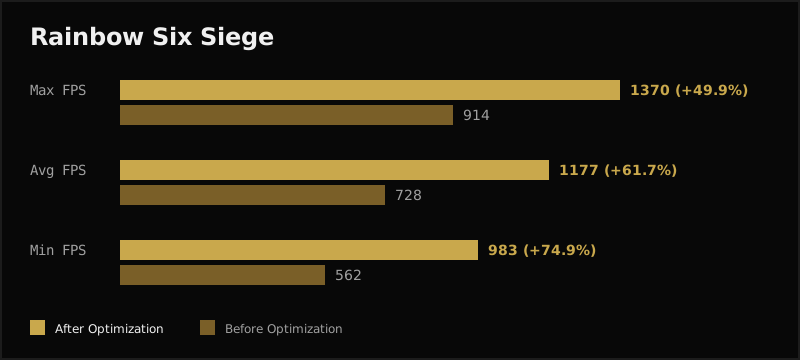
Rainbow Six Siege benchmark — before vs after optimization
R6 Siege · Before vs After
Rainbow Six Siege
R9 9800X3D · RTX 3080 12GB · DDR5-6400 CL28
▲ +61.7% Avg FPS ▲ +74.9% Min FPS ▲ +49.9% Max FPS Higher is better
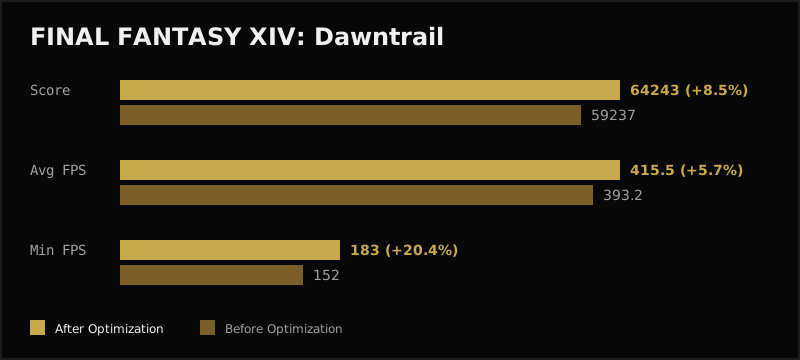
Final Fantasy XIV benchmark — before vs after optimization
FF XIV · Before vs After
Final Fantasy XIV
R9 9800X3D · RTX 3080 12GB · DDR5-6400 CL28
▲ +5.7% Avg FPS ▲ +20.4% Min FPS ▲ +8.5% Score Higher is better
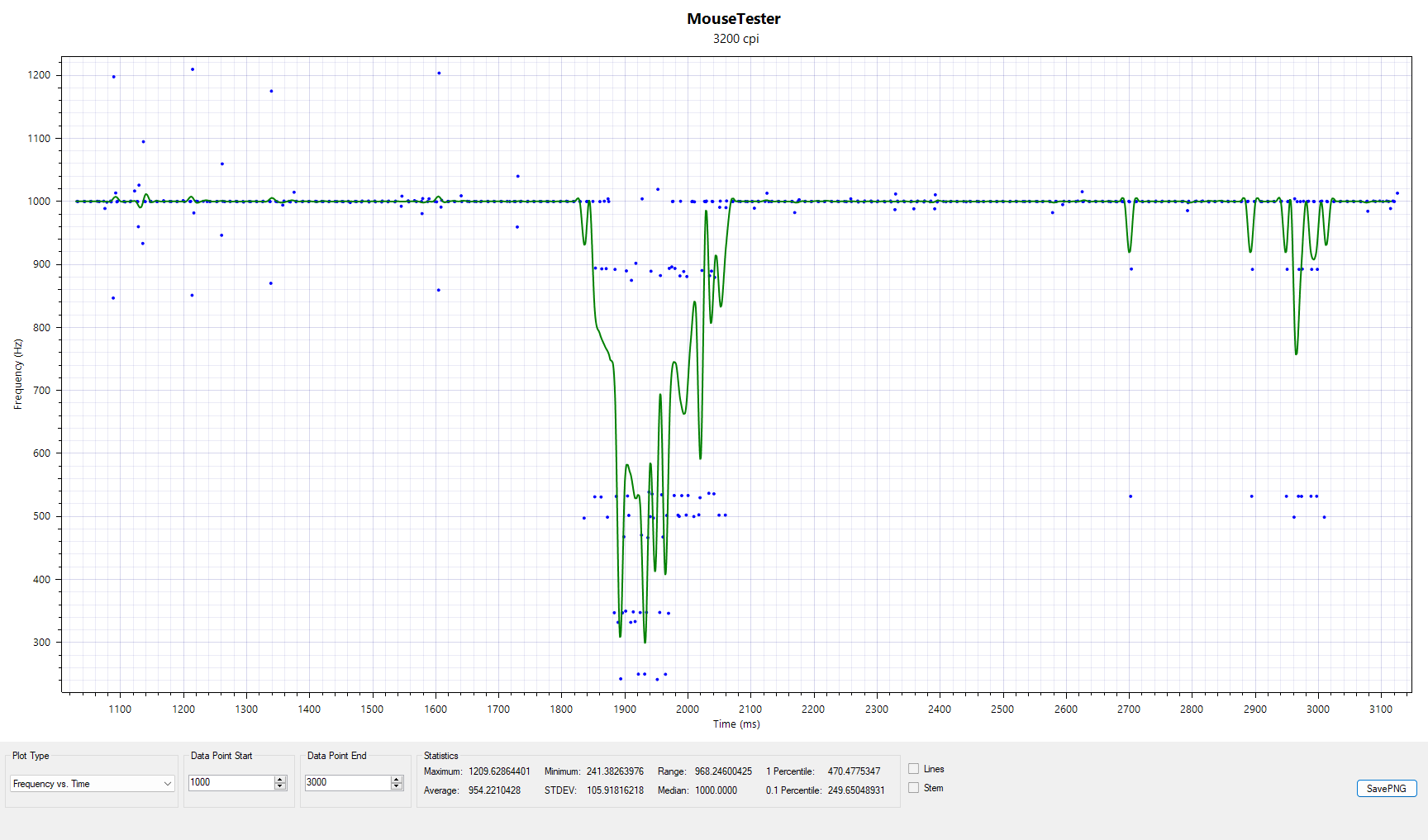
Mouse polling rate before optimization — MouseTester 1000hz
Mouse Polling · Before
Mouse Polling Rate — Before
R9 9800X3D · RTX 3080 12GB · DDR5-6400 CL28
STDEV 105.91 Hz Baseline · Pre-optimization
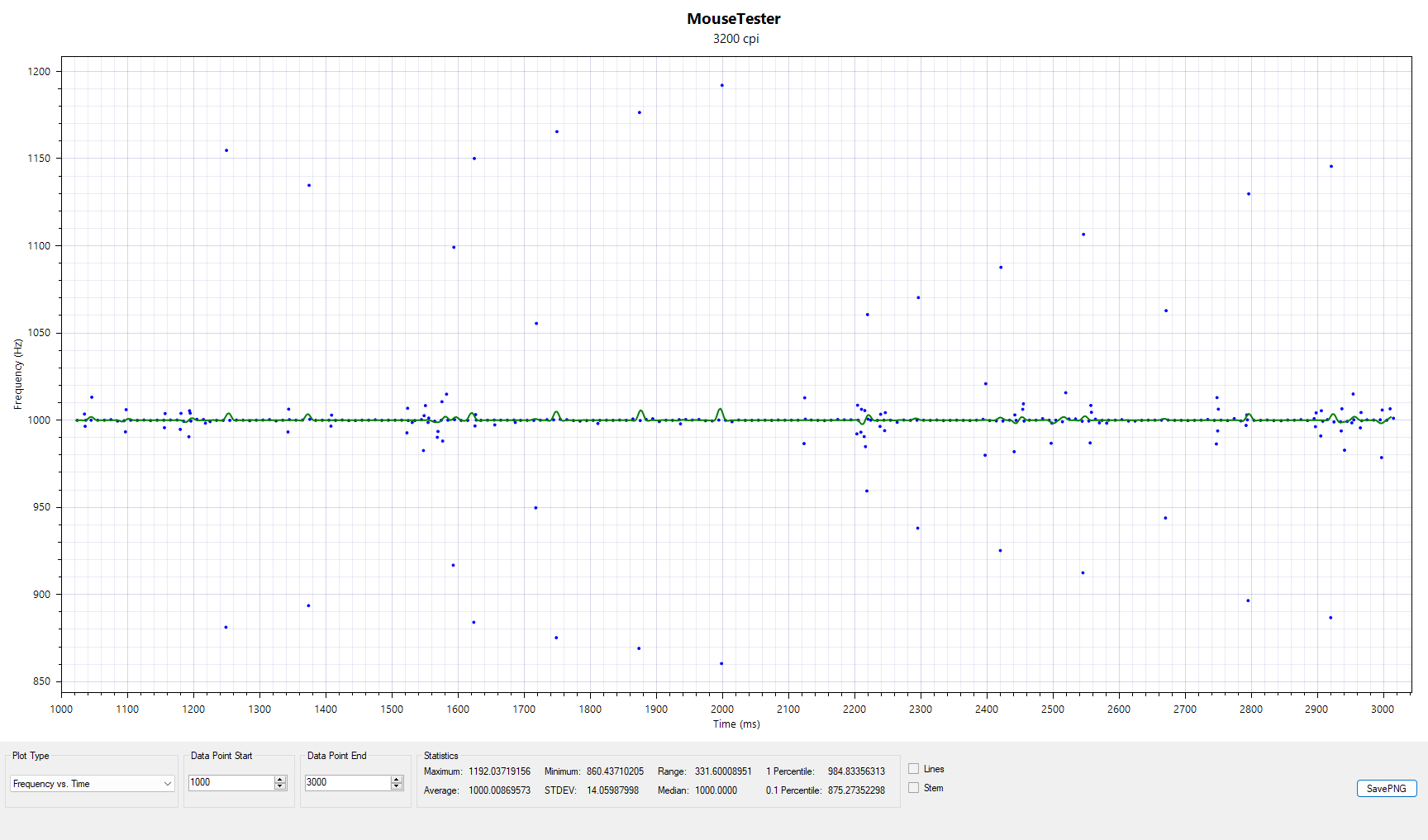
Mouse polling rate after optimization — MouseTester 1000hz
Mouse Polling · After
Mouse Polling Rate — After
R9 9800X3D · RTX 3080 12GB · DDR5-6400 CL28
▼ STDEV 14.05 Hz (−86.7%) Lower is better · More consistent
Testimonials
What clients say

Rated 4.9/5 across hundreds of optimization orders.

"Went from constant microstutter in Warzone to silky smooth. The BIOS guide was genuinely the clearest thing I've ever followed."

"My ram wasn't even running at its rated speed. After the RAM tune my 1% lows jumped a ton in fortnite. 0 delay."

"The tool alone is worth it. I noticed the difference immediately and the input delay is so much better."

Trusted by competitive players & PC enthusiasts
dysenic · jadebolt · clement · splikfnr · n1trolex
— and hundreds of others —
4.9
Avg. rating
100+
Happy customers
24hr
Delivery target
100%
Tailored — not generic
Risk Disclosure & Disclaimer

Overclocking carries inherent risk. Modifying CPU, RAM, or GPU settings beyond manufacturer specifications may cause system instability, data loss, reduced component lifespan, or hardware damage. These are real possibilities — understand this before proceeding.

All guides and configurations provided by Vortex FPS are educational in nature. We provide information on what to change and why — the decision to apply any setting is made solely by you. By purchasing any service or product, you confirm that you accept full responsibility for any outcome on your hardware.

Vortex FPS is not liable for any damage, data loss, or failure resulting from following our recommendations. Overclocking may void your CPU, motherboard, or RAM warranty. Disabling security features (e.g. Secure Boot, fTPM) may affect Windows 11 eligibility and system security. Results vary by individual hardware quality and silicon lottery — not every chip achieves the same headroom. All benchmark figures shown represent real client results from other PCs and are not guaranteed outcomes for your specific hardware. Our liability in any case is limited to the amount paid.